deviant art

Deviant Login Shop  Join deviantART for FREE Take the Tour
[x]
Download File
ZIP, 330 KB
more ▶

More from ~aidaaah

Featured in Groups:

Details

April 16, 2009
330 KB
Link
Thumb

Statistics

Comments: 119
Favourites: 230 [who?]

Views: 179,268 (36 today)
Downloads: 35,250 (12 today)

License

Creative Commons License
Some rights reserved. This work is licensed under a
Creative Commons Attribution-Noncommercial-Share Alike 3.0 License.
[x]
:iconaidaaah:
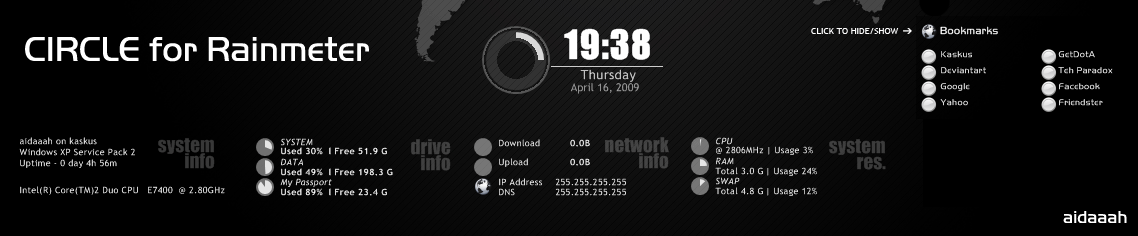
Inspired by Jiri Mahel's HUD.Vision and Kaelri's Enigma.

This is both my first Rainmeter skin and Deviantart submission.

Open the corresponding *.ini file or simply choose edit skin ;) for some more details.

Any comments are welcome.
Add a Comment:
 
:iconkazek127:
~kazek127 Apr 21, 2013   Photographer
nice
Reply
:iconjulianthelone:
Mood: Joy ~julianthelone Apr 14, 2013  New member
Thanx >,<
Reply
:iconpaledale78:
~paledale78 Feb 16, 2013  Professional Artist
thank you / 1 of my fave rainmeter skins ty
Reply
:iconkantori:
For those looking to change the time from the 24hour to 12 hour. Make a copy first then go to Edit Skin > Under "HOUR AND MINUTE" look for "Format=%H:%M" Simply change H to I that's it.

You can add the seconds too if you like simply add %S at the end of %M. However it will move a bit due to the seconds being added. To fix that delete "CENTER" from "StringAlign=" under [MeterTime] code and align by finding "x=143" four codes above and set it to about x=80 or to whatever you wish.
Reply
:iconjmppa:
Good skin but I have some problems with core clock numbers. I have overclocked i5 and it only shows 3200 MHz even my core is at 4500 MHz. You have any idea how to solve this?
Reply
:iconxray1908:
kaskuser gan?
haha
Reply
:iconpanda4cash:
I put the Circle folder into the skins directory but i can't find it in my rainmeter. I restarted the software a couple times
Reply
:iconkingcreolees:
On sysinfo.ini you wote: "; Still looking for a way to display the VGA Card info properly :("

Thats what I did. Opened regedit and seach for the name of my videocard (the same string that appears on Device Management). Copy the path to the key and paste it at the .ini.

Now, the code looks this way:
[MeasureVGA]
Measure=Registry
RegHKey=HKEY_LOCAL_MACHINE
RegKey=SOFTWARE\Microsoft\Windows NT\CurrentVersion\Winsat
RegValue= PrimaryAdapterString
* (do not write an space between = and Primary..., or any other word. I had to put it to avoid the =P smiley)

I translated the skin, so it looks different to the original: [link]

Sorry for my english. Hope this can help.
Reply
:iconaidaaah:
Over 3 years now and I'm still getting feedback :)

What a great community this is.

Thanks for your attention ~KingCreolEs, i have tried using registry key to display it but somehow it's not always working on different PC.
I no longer follow rainmeter development up to now, maybe now there's a plugin that can display it correctly on every PC, but when I made this skin there's no such plugin available.

Once again thank you for all the feedback and hope you enjoy using this skin. :)
Reply
:icong1raz0r:
Did i see the GetDotA website there?..Epic!!...=D
Reply
Add a Comment: